
A page loads quickly, yet opening its menu or applying a filter feels delayed. A load-only test may never exercise that failure. Investigate the interaction itself: what the visitor did, which work delayed the response, and when the next visible frame appeared.
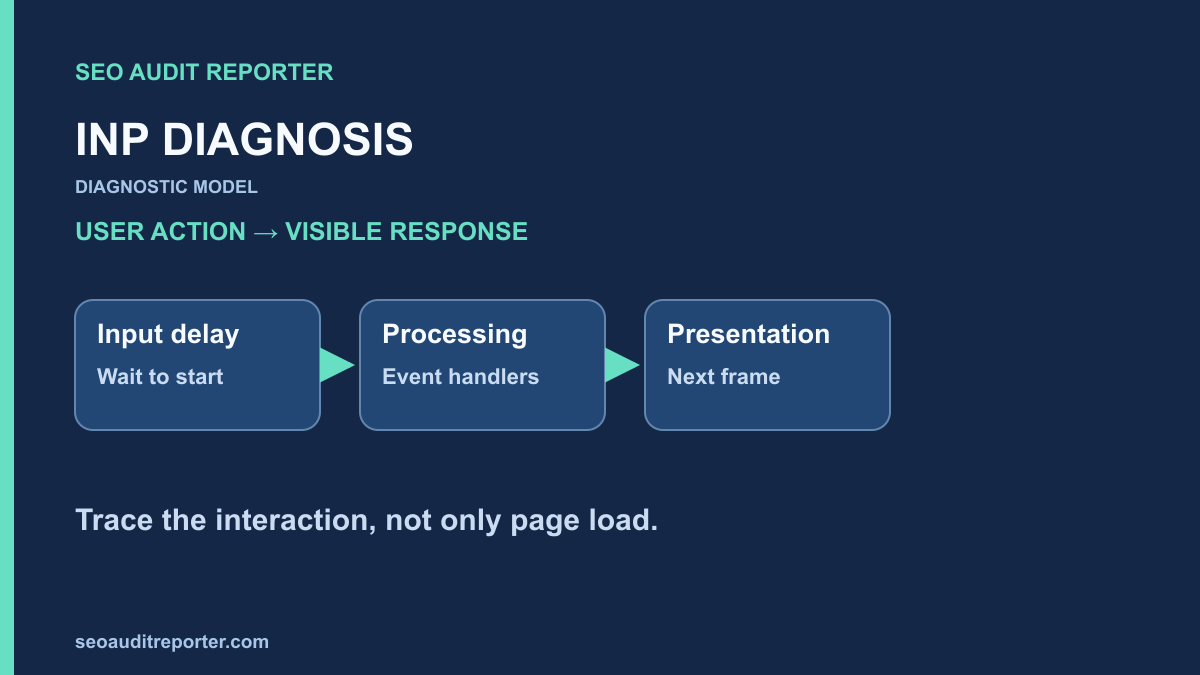
Use INP for interaction responsiveness
Interaction to Next Paint evaluates responsiveness to qualifying interactions such as clicks, taps, and keyboard input over a page visit. The web.dev INP reference describes a good value as 200 milliseconds or less at the 75th percentile, assessed separately for mobile and desktop. Scrolling and hovering are not the interaction types the metric directly measures.
A good loading score does not establish good INP. Visitors can encounter long tasks after page load, expensive filters, or complex layout updates. Conversely, a slow network response after a click is not automatically identical to the delay before the next paint; inspect how the interface responds while work continues.
Begin with the Core Web Vitals workflow to identify affected device groups and templates. Record whether the available evidence describes a specific URL or a wider origin. Label limited data rather than presenting it as a universal site measurement.
Build a real interaction sequence
List the meaningful actions available on the affected template: open navigation, dismiss consent, search, expand details, choose a filter, add an item, or submit a form. Reproduce the order a visitor might actually use. A slow interaction may occur only after another component has loaded or after many items have accumulated.
Record viewport, device or CPU emulation, network conditions, login state, consent state, data size, and cache state. Include the tested control’s visible label and the expected response. Keep these conditions consistent before and after a repair.
Use representative mobile conditions as well as a desktop check. A development machine may process work much faster than a constrained visitor device. Avoid selecting an unrealistically severe test solely to create a failure, but do not assume your fastest computer represents the affected audience.
Capture the interaction in a performance trace
Record a browser performance trace while performing the action. Note the interaction event, long tasks, handlers, layout work, and next visible update. Chrome’s Performance panel documentation explains the available tracing workflow. Use the current interface to inspect evidence rather than inventing a tool feature or relying on an old screenshot.
Reproduce several times and preserve both slow and ordinary examples. Intermittent stalls can involve background work, third-party scripts, or the timing of input relative to another task. A single trace can suggest a cause without establishing its frequency.
If you collect real-user interaction details, follow the site’s privacy and consent practices. Avoid recording typed personal information or sensitive form values. Control identity, timing, and a non-sensitive route label may be sufficient for diagnosis.
Separate the delay into three parts
The INP optimization guide distinguishes input delay, event processing duration, and presentation delay. This breakdown points to different repairs. Reducing one handler’s work will not necessarily fix a large wait before that handler starts.
Input delay: work already occupying the main thread
Inspect the time between the visitor input and the start of its event handling. Look for tasks already running: initialization, parsing, timers, analytics, or application work. Identify the owner of the task using the trace and source references where available.
Check whether nonessential work can be scheduled differently or split into smaller tasks. Breaking work into chunks can create opportunities for input processing, but the implementation must actually yield execution; wrapping the same synchronous work in another function does not solve the scheduling issue.
Do not remove a security or consent component blindly because it appears in a trace. Establish the expensive operation and coordinate with its owner. The smallest supported change that reduces demonstrated blocking is easier to verify than a broad replacement of the entire component.
Processing duration: the handlers do too much
Inspect the work triggered by the action. A filter might sort a large data set, rebuild many elements, or run several listeners. Compare the requested task with what the implementation actually does. Duplicate listeners can repeat work even though the visitor clicked only once.
Consider reducing unnecessary calculation, limiting the amount of data processed, or moving appropriate computation off the main thread. These options depend on the application; a worker is not a universal repair for work that must manipulate the DOM. Keep the output and business rules unchanged when optimizing.
For a hypothetical product filter, updating only changed results may be more appropriate than rebuilding the full page. That is a diagnostic possibility, not a claim that every framework performs a full rebuild. Use trace evidence to choose the relevant implementation change.
Presentation delay: the next frame is expensive
Inspect style recalculation, layout, and paint after the handlers complete. A large DOM or widespread visual updates can delay the next frame. Check whether code repeatedly reads layout information between writes, causing avoidable layout work.
Reduce the scope of updates where feasible and evaluate techniques suited to the actual interface. Hiding large sections, virtualizing lists, or changing rendering behavior can affect accessibility, find-in-page, and navigation. Test those consequences rather than applying a performance technique as a blanket rule.
Separate visible feedback from eventual completion
A form can immediately show an appropriate pending state while waiting for a server response. That visible feedback helps the visitor understand that the action was received. It does not make the final operation faster, and it must not falsely announce success before the server confirms it.
Measure the next paint and the complete task as separate outcomes. A quick spinner followed by a long unexplained wait can meet one timing goal while still delivering a poor experience. Preserve cancellation, error handling, focus behavior, and assistive-technology feedback.
Do not game the metric by deferring essential work indefinitely or removing useful interactions. The acceptance criterion should include correct results and a clear response, not only a smaller number in one trace.
Prioritize repeated, important interaction failures
Group findings by component and visitor task. A shared navigation stall can affect many pages; an expensive optional control may affect a narrower audience. Use observed frequency and reach when available, and state uncertainty when the evidence is only a laboratory reproduction.
The prioritized fix-list approach helps assign an owner and a concrete acceptance test. Describe the control, reproduction steps, measured delay segment, suspected cause, and expected change. This is more actionable than an issue titled only “Improve INP.”
Check loading and interaction together after a repair
Changing when scripts run can move work from page load to the first interaction. A loading improvement may therefore introduce a later stall. Use the LCP diagnosis alongside interaction tests when your release changes initialization or resource scheduling.
Conversely, moving interaction-related setup earlier can add loading work. Compare the actual visitor journey and avoid optimizing one phase in isolation. Include layout stability and functional checks when a repair changes the rendered interface.
Verify with the same journey and later field evidence
Load the actual public deployment, perform the recorded sequence, and capture comparable traces. Confirm that the intended script or component version is present. Repeat tests across representative data sizes and consent states so a cached or unusually small test case does not conceal the original failure.
Use the deployment comparison process for complementary URL and metadata checks when the same release touches routing or templates. A crawler cannot substitute for performing the interaction; retain the performance trace and functional result separately.
Monitor later field evidence for the affected segment, allowing for the observation period’s inclusion of earlier visits. Report controlled improvements and field outcomes distinctly. If the interaction remains slow, revisit the delay breakdown rather than adding another speculative scheduling change.
Keep a reproducible interaction finding
- The control, page template, and visitor sequence are documented.
- The environment and relevant state are recorded.
- The slow trace identifies input, processing, or presentation delay.
- The repair preserves correct results and accessible feedback.
- Comparable public tests demonstrate the intended change.
- Remaining field uncertainty is stated explicitly.
A useful INP repair makes a real action respond more promptly while keeping its purpose intact. That is the outcome your measurements should help explain.