
A page’s largest visible element appears late, but compressing the hero image barely changes the result. The delay may occur before the image request starts or after the file has arrived. Diagnose the actual LCP element and its timeline before choosing an optimization.
Establish the affected experience from field evidence
Largest Contentful Paint measures when the largest eligible content element in the viewport is rendered during the relevant loading experience. Google’s LCP reference describes a good result as 2.5 seconds or less, evaluated at the 75th percentile and segmented by mobile and desktop. A single fast laboratory run cannot establish that real visitors meet that threshold.
Start with available field data and identify the affected URL group, device category, and observation period. If the data covers an origin rather than the exact page, label that scope. Do not present an origin aggregate as a precise measurement for one article.
Use the existing Core Web Vitals investigation to separate field evidence from a controlled reproduction. Your lab test should help explain a real symptom, not replace it with a different environment that happens to score well.
Choose a representative test and record its conditions
Select a page using the affected template and note viewport, device emulation, network and CPU settings, cache state, consent state, and login state. Include a normal visitor journey when cookie banners or personalization change what appears above the fold.
Run several comparable loads rather than choosing the fastest trace. A cold cache and a warm cache answer different questions; keep their results separate. Test a sibling page to determine whether the problem belongs to a template or to one unusually large asset.
Keep the trace, screenshot, request waterfall, and public URL with the finding. A metric value without the candidate element and timeline cannot show which part of loading the proposed fix should change.
Identify the actual LCP element
Use a browser performance trace to locate the LCP marker and inspect the associated element. It might be an image, a text block, or another eligible content element. Do not assume that the visually prominent hero image wins on every viewport or consent state.
The candidate can change as larger content appears during loading. Review the final reported candidate for the trace you are diagnosing. A screenshot taken after the page settles may not reveal which element controlled the earlier measurement.
If the candidate is an image, record its rendered dimensions, requested resource, format, and responsive selection. If it is text, inspect fonts, styles, and rendering dependencies. A background image and an ordinary image element can have different discovery paths even when they look identical to readers.
Split the timeline into four diagnostic parts
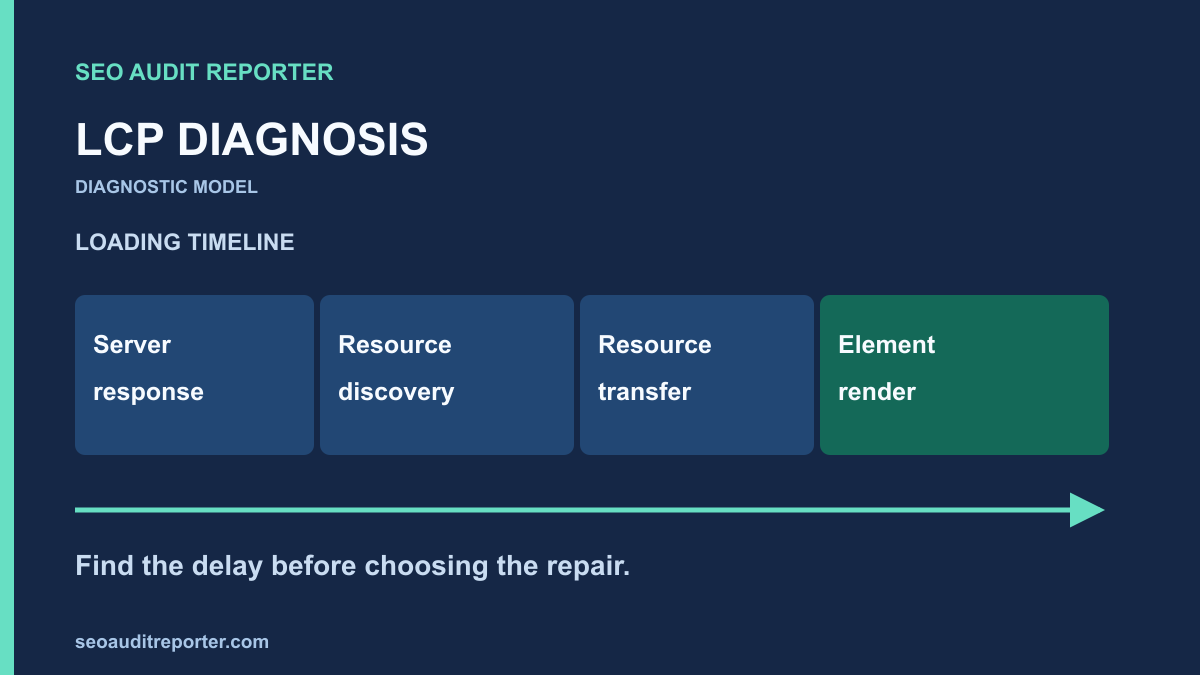
The web.dev LCP optimization guide separates the timeline into server response time, resource load delay, resource load duration, and element render delay. Use these parts to describe where time is spent. A text element using a system font may not have a separate resource transfer in the same way an image does.
Server response time
Inspect the navigation request and the time before the HTML response begins. Compare regions and cache states where you have appropriate test access. Slow application work, cache misses, upstream dependencies, or network conditions can all require investigation, but the trace alone may not reveal the server-side cause.
Coordinate with the server owner and compare request logs or application timings when available. Do not change DNS or CDN configuration as a speculative first move. Establish whether the delay is repeated, which requests exhibit it, and which layer contributes measurable time.
Resource discovery delay
Find when the browser discovers and starts requesting the LCP resource relative to the HTML response. A resource introduced by a late script, nested stylesheet, or client-side rendering can begin much later than an image discoverable in the initial markup.
Check whether an above-the-fold LCP image is incorrectly lazy-loaded. Consider making a genuinely critical image discoverable earlier and using an appropriate priority hint when supported by the page’s implementation. Avoid preloading every image; competing priorities can make the important request harder to identify.
Resource transfer duration
Inspect the resource’s transferred size, delivery path, and response timing. Compare the requested dimensions with the displayed dimensions. A mobile viewport downloading a desktop-sized image may benefit from correct responsive selection, but check the actual request rather than only the available source files.
Use an appropriate image format and compression level while inspecting visible quality. Confirm that resizing or re-encoding does not distort diagrams, remove necessary detail, or break caching. The objective is a smaller suitable asset, not the smallest file regardless of the reader’s experience.
Element render delay
A resource can finish downloading before its element becomes visible. Inspect stylesheets, font behavior, main-thread work, visibility conditions, and client-side transitions between the resource completion and paint. An image optimization cannot remove a delay caused by code that hides the image until another task finishes.
For text candidates, investigate the font and layout dependencies relevant to that block. Do not apply a universal font-loading fix without checking fallback behavior and layout shifts. A faster paint that causes a disruptive layout change needs evaluation against the wider experience.
Turn one trace into a testable hypothesis
Write the observed delay, suspected cause, proposed change, and expected timeline effect. For a hypothetical image discovered late by a script, the hypothesis might be that moving its source into the initial markup reduces discovery delay. The acceptance test should then inspect request start time and LCP, not just file size.
Change one major cause at a time when practical. If a deployment simultaneously replaces images, changes caching, and removes scripts, a faster result may be difficult to attribute. Keep broader releases documented so later regressions can be traced to the changed components.
Use the audit prioritization method to weigh affected reach, evidence, and implementation risk. A repeated delay on an important shared template can deserve attention ahead of a one-off page with little demonstrated impact.
Watch for fixes that move the problem elsewhere
Earlier resource loading can compete with other critical requests. Removing visible content can make a metric smaller while damaging the page’s purpose. Deferring scripts may improve loading but interfere with navigation or consent behavior. Test the task as well as the measurement.
Check interaction responsiveness through the INP diagnosis workflow when a loading optimization changes main-thread scheduling. LCP and INP describe different aspects of the experience. A better loading trace does not prove that a menu or filter responds promptly.
Inspect layout stability when image dimensions, fonts, or placeholder behavior change. Preserve the intended content and accessible controls. Avoid treating one Core Web Vital as the only acceptance criterion for a production page.
Verify the deployed resource and repeat the trace
Fetch the public page after deployment and confirm the actual markup, resource URL, and headers. A local asset replacement does not prove that the normal public response uses it. Compare ordinary and cache-bypass requests if a stale response is suspected.
Repeat the same lab conditions and compare the candidate element and timeline parts. Report the range of observed runs rather than one selected improvement. If the candidate changed, explain that change before comparing values as though they measured the same loading path.
The deployment comparison guide can help verify page-level regressions such as changed status or canonical output, but a crawl is not a performance trace. Keep those checks complementary and use each tool for the evidence it actually supplies.
Monitor the field result without promising a deadline
Record the release time and continue monitoring comparable field segments. Aggregated field data may include experiences from before the repair, so an immediate unchanged report does not by itself disprove the lab result. Also check whether the repair reached all affected templates and visitors.
Close the technical finding when the intended loading change is deployed and reproduced under controlled conditions. Keep the field outcome as a separate monitored result until sufficient later evidence is available. Report remaining uncertainty instead of guaranteeing a score or ranking change.