
A sitemap can be accepted by Search Console while still listing redirected, removed, or noncanonical pages. A successful submission tells you that the file was processed; it does not establish that every listed URL is a suitable search destination. Audit the inventory and its generating system, not just the XML syntax.
Define the intended URL inventory
Start with a list of public pages you want considered for indexing. Distinguish these from account pages, internal search results, temporary previews, and duplicate parameter variants. A sitemap should represent a deliberate publishing inventory rather than every URL the application can produce.
Google describes sitemaps as a discovery aid in its sitemap overview. Submission does not guarantee crawling or indexing. This matters when interpreting a low indexed count: the next step is to investigate the listed pages, not to repeatedly upload the same file.
Record the canonical host, protocol, URL conventions, and inclusion rules. Note whether the sitemap generator uses publication state, content type, language, or indexing settings. These rules become acceptance criteria when you find a stale entry or a missing public page.
Discover all active sitemap sources
Check the sitemap locations declared in robots.txt and the files submitted in the correct Search Console property. Compare these with the current application or plugin configuration. An older generator can leave an accessible file that nobody maintains while a different file serves the current inventory.
Request each index and child file with GET. Record response status, final address, content type, and body. An XML-looking URL can return an HTML error, login screen, or security challenge. Test compressed files through a tool that actually decompresses and parses them rather than reading their extension as proof.
Use the robots.txt audit to examine declared sitemap addresses and relevant crawl policies. The declaration is a location hint; it does not establish that the referenced document is current or that its listed pages are allowed.
Follow indexes to the actual URL sets
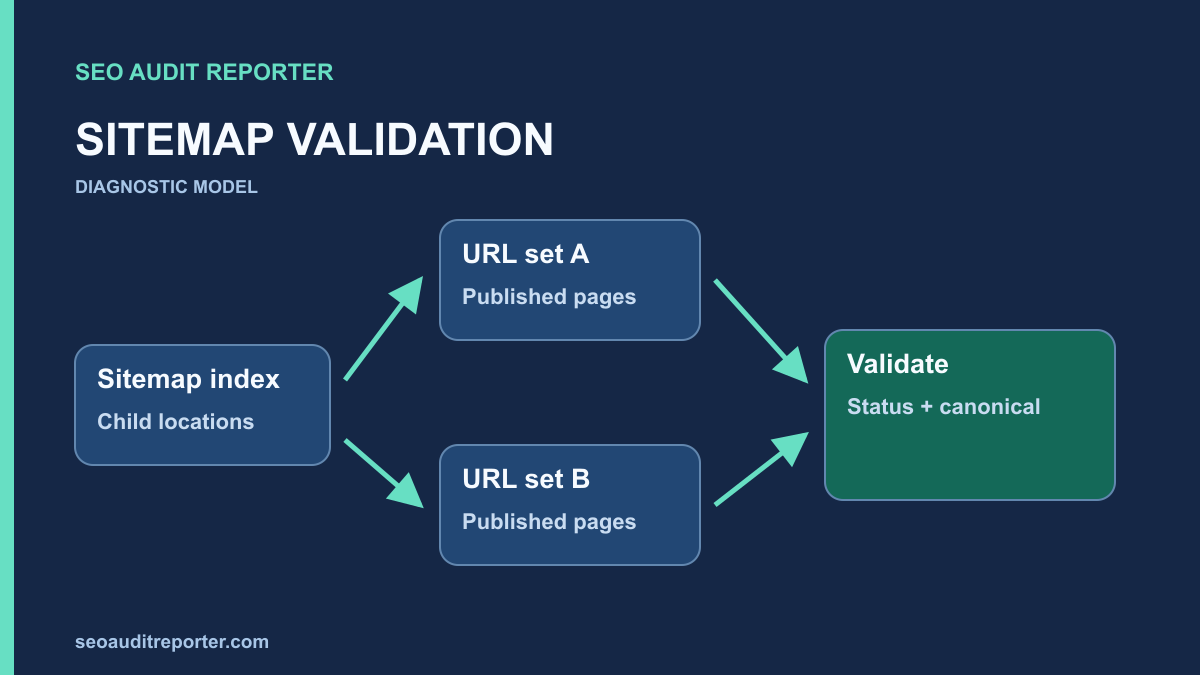
Extract every child sitemap location from the index and fetch it. Keep the parent-child relationship in the audit data. A working index with a broken child file can hide an entire section from a submission-focused check. Group failures by child file so the application owner can identify the responsible content source.
For large inventories, check the format limits against Google’s sitemap creation guidance. A single sitemap is limited to 50,000 URLs and 50 MB uncompressed. Split larger sets predictably and use an index rather than relying on a large compressed transfer size as the only check.
Parse URLs as data before crawling them
Use an XML parser and export the loc values with their source file and optional lastmod values. Validate encoding, namespaces, escaping, and complete document structure. A raw text search may find URL-shaped strings without establishing that the document is valid XML.
Check for duplicate entries across files, unexpected hosts, protocol inconsistencies, malformed addresses, and whitespace. Preserve the original URL string while adding separate parsed fields. Aggressive normalization can conceal the very variations the audit needs to explain.
Compare totals with the publishing inventory. If the application says a section has fifty public pages but its sitemap lists thirty, investigate the missing set. That discrepancy is a lead, not evidence that all twenty missing URLs require inclusion: some may be deliberately excluded or consolidated.
Request the listed destinations
Run a modest, authorized list crawl of the extracted URLs. Capture response status, redirect chain, final URL, canonical, indexing directives, and content type. Save the crawl configuration and avoid high concurrency that could create server errors unrelated to normal site behavior.
Classify results into eligible direct responses, redirects, errors, blocked requests, intentional exclusions, and canonical conflicts. Review a representative sample from every important group. A crawler’s “indexable” label can help organize evidence, but it is not Google’s promise to index the page.
Redirects and removed pages
When an old address redirects to a preferred page, normally update the generating inventory to that preferred address. Confirm the destination first. Removing the old sitemap entry does not eliminate the need for a valid redirect when visitors or external links still request the old URL.
For 404 or 410 responses, determine whether the removal was intentional. Remove intentionally retired pages from the active sitemap through the publishing system. Restore an accidentally missing page or repair routing when it should remain public. Do not manufacture a generic homepage redirect solely to make the sitemap crawl return successful responses.
Noindex and canonical differences
Inspect meta robots and applicable response headers. A sitemap entry that asks for discovery while its page deliberately asks not to be indexed creates a policy conflict. Decide which intent is correct with the content owner; do not blindly remove the restriction.
Compare each URL with its declared canonical target and request that target. Use the canonical audit when a template points many unrelated pages to one address or when protocol and parameter variants disagree. The sitemap should communicate the preferred inventory consistently with the page’s other signals.
Review parameters, pagination, and language variants
Parameter URLs need an explicit policy. Some represent useful distinct pages; others only change sort order or tracking. Inspect the content and intended search role rather than excluding every URL containing a question mark. Record why an included variant belongs in the inventory.
Do the same for pagination and language pages. A paginated URL may expose different content, while a language version may serve a distinct audience. Avoid forcing every member of these groups to one canonical or removing them from the sitemap simply because their templates look similar.
When multiple generators produce the same URL under different forms, fix the generating rule. A manual XML cleanup will be undone at the next rebuild if the source still contains outdated hostname or publication logic.
Check whether lastmod describes real changes
Compare lastmod values with a sample of actual content changes. Google recommends using accurate values that reflect significant page updates, including meaningful main-content, structured-data, or link changes. Updating every date on every request creates noise rather than a trustworthy modification signal.
Do not interpret the absence of a lastmod value as an automatic indexing failure. It is optional. If the system cannot produce reliable values, correct the data model before adding dates merely for appearance. Also avoid spending audit effort on priority and changefreq values as ranking controls; Google’s documentation says it ignores those fields.
Interpret Search Console feedback by stage
Separate file retrieval or parsing errors from URL-level indexing outcomes. First establish whether Google could retrieve and understand the submitted sitemap. Then investigate important listed URLs individually. A valid sitemap can include pages that Google has not selected for indexing for reasons outside the XML file.
The Crawled – currently not indexed investigation explains how to compare recorded and live observations without inventing a cause. Keep report dates with the file version and deployment time so an old report is not mistaken for proof that a new repair failed.
Use the sitemap to find discovery gaps
Compare sitemap URLs with a normal link-following crawl. A page listed in the sitemap but absent from that crawl may lack an internal route, or the crawl may have excluded it. Investigate the difference through the orphan-page workflow before declaring it an orphan.
A sitemap does not replace useful site navigation. If an eligible page matters to readers, identify a relevant parent or guide that should link to it. Keep this as a separate repair from sitemap cleanup so both inventory and discovery can be verified.
Verify the regenerated files and sample pages
After changing the generator, fetch the normal public index and every affected child file. Confirm that retired entries disappeared, preferred destinations replaced redirects, and intended new pages are present. Compare the new inventory with the saved original and explain every significant change.
Request representative listed pages again, check their directives and canonical targets, and verify that the public files survive a normal regeneration. Submit the appropriate current file when needed, then monitor later feedback. A closed sitemap finding should include valid files, a justified inventory, and working listed destinations—not only a submission success message.