
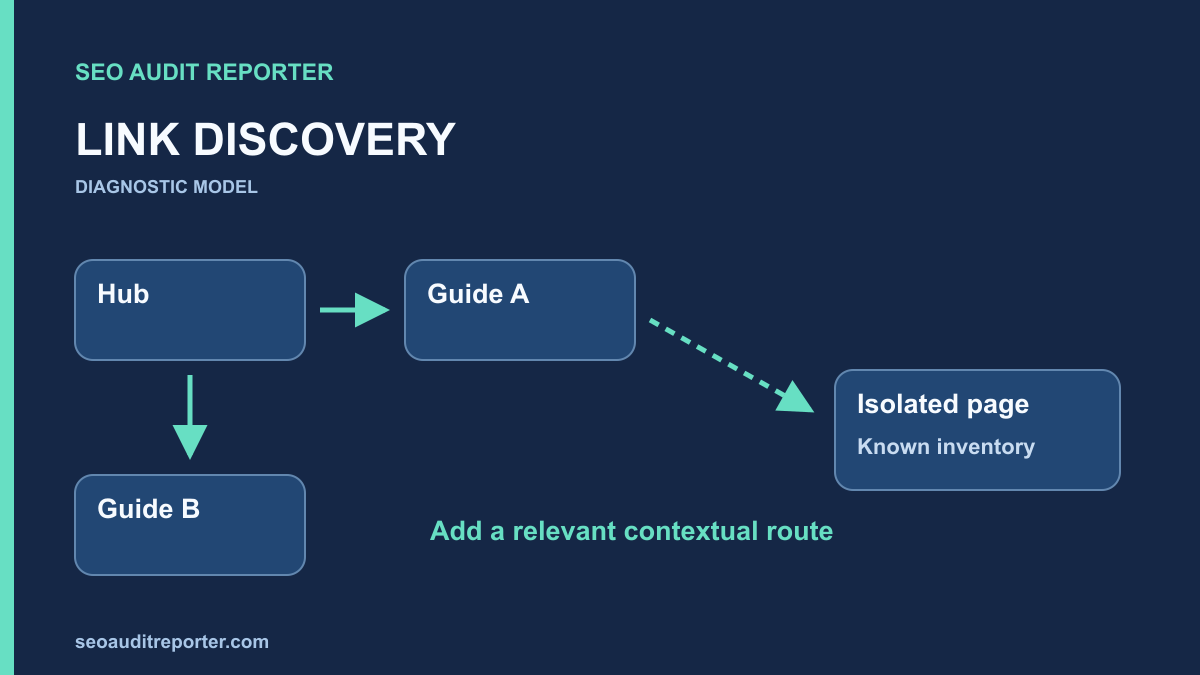
A sitemap contains a useful guide, but a crawl starting from the homepage never finds it. That gap makes the page an orphan candidate, not an automatic deletion candidate. Compare the inventories, check the crawl boundaries, and establish whether readers have a relevant route to the page.
Use an operational definition of an orphan
For this audit, an orphan candidate is a known public URL that a normal internal link-following crawl did not discover within the chosen scope. The qualification matters. A crawl may stop early, exclude a directory, skip rendered navigation, or fail to fetch a linking page.
A page reached only through a sitemap or a manually supplied URL list has been discovered by that input, not by the site’s link graph. Keep these discovery methods separate. Otherwise, combining all sources in one crawl can conceal the absence of incoming internal links.
Google’s link guidance explains crawlable anchor markup and useful link context. Apply that guidance when evaluating a real route. A mention of a page title without a usable link is not the same relationship.
Create two inventories with different jobs
The linked inventory
Run a crawl from the normal public entry point with internal link following enabled. Record allowed hosts, exclusions, rendering mode, maximum depth if used, and any crawl limit. Avoid supplying sitemap URLs as additional starting points for this inventory if your goal is to measure link-based discovery.
Export discovered URLs and incoming source-target relationships. Include status and canonical information so a redirected old address is not mistaken for a disconnected preferred page. Save the crawl configuration and completion state; an interrupted crawl cannot establish a complete absence of links.
The known inventory
Build a separate set from current sitemaps, CMS exports, relevant analytics landing pages, Search Console examples, and authorized server logs. Each source answers a different question. A CMS knows stored content, while analytics records only observed activity within its collection limits.
Attach a source label and observation date to every URL. An old analytics entry may refer to a retired page. A server log can contain bot requests to invented addresses. A sitemap can contain stale entries. These are candidates for review, not an authoritative list of everything that should remain public.
Compare URLs without hiding meaningful differences
Parse addresses into host, path, and query components, while retaining the original strings. Remove fragments when comparing document URLs, but investigate fragment navigation separately. Do not remove every parameter or lowercase every path unless the site’s actual routing makes those transformations safe.
Map redirects and confirmed canonical relationships explicitly. If the linked inventory contains an old URL that redirects to a known page, the route may exist indirectly. Record that distinction and consider updating the link, rather than labeling the destination as completely orphaned.
The crawl comparison process describes a repeatable join between URL inventories. A simple spreadsheet or script can produce candidates by subtracting linked URLs from known eligible URLs. Keep unmatched records and normalization decisions visible for review.
Rule out crawl limitations first
Check whether the crawl completed, encountered rate limits, or excluded a section. Inspect the source pages that should link to the candidate. If a category page failed to load, dozens of detail pages may appear disconnected because the crawl never reached their parent.
Inspect both initial HTML and rendered navigation when links depend on scripts. Google’s JavaScript SEO basics explains the distinction between crawling and rendering. Use that distinction to investigate an absent anchor without assuming that all script-generated navigation is invisible.
Test pagination, load-more behavior, search-only discovery, and mobile menus. A page may be reachable for a visitor who enters a specific query yet lack any persistent contextual route. Record the exact mechanism rather than reducing every discovery gap to a single orphan label.
Decide whether the candidate should be connected
Request the page publicly and inspect its status, main content, canonical, and indexing directives. Confirm its publication state and intended audience with the owner. A private preview, deliberately retired page, or duplicate alternate may not need a new public link.
Check its sitemap role through the sitemap audit. If a removed page survives only in stale inventory, repair that inventory. If a valuable current page is listed but has no relevant links, create a useful route rather than treating the sitemap as sufficient site navigation.
Assess whether the content still serves a distinct task. Do not link to an outdated or misleading page just to reduce a report count. An editorial update or planned retirement may be the correct action, but preserve existing content until that decision is authorized.
Find the right source page for a new link
Identify the reader’s natural next question. A troubleshooting overview can link to a detailed diagnosis; a category hub can introduce a useful subtopic; a related guide can reference a prerequisite. The source should explain why the destination is relevant in its surrounding text.
Use a descriptive anchor with an ordinary href to the preferred public URL. Avoid a sitewide footer dump containing every orphan candidate. That can create nominal incoming links without improving the reader’s route or the site’s organization.
For a hypothetical documentation site, a guide about exporting reports might belong in the reporting overview and in a troubleshooting article about missing exports. Those two routes have clear purposes. Adding it to every unrelated product page would create clutter rather than a sensible information path.
Check whether broken links caused the isolation
Sometimes the intended route exists but points to an old or malformed URL. Review historical slugs, redirects, and incoming links to similar addresses. The broken-link workflow helps trace the source component and choose a repair that restores the original journey.
Fix the existing useful route before adding new ones unnecessarily. If a migration removed links from a shared component, repair the generating template or content relationship. A manual link in one guide may hide a broader information-architecture regression.
Prioritize gaps with a clear publishing purpose
Give attention to valuable public pages that lack any persistent relevant route, especially when an important task depends on them. Group candidates by cause and template. A missing related-content field can affect many pages, while an intentionally retired document may require no new link.
Use traffic or search observations as supporting evidence where available, but do not equate zero recorded visits with zero value. Tracking can be incomplete and newly published pages may lack history. Explain confidence and business relevance separately.
If the page is also excluded from search, use the indexing investigation to check other evidence. Adding links can improve discovery and navigation, but it does not guarantee indexing or establish that the missing link was the only cause.
Verify discovery through the repaired route
Fetch the source page after publishing and inspect the actual href. Open the destination and confirm that the content is correct. Check that a cached response does not still omit the new link. Test any interactive navigation required to reveal it.
Rerun the link-only crawl from the same entry point with the same scope. The destination should now be discovered through the intended source relationship. Record the incoming link and the crawl path, not merely that the URL appears after you supplied it directly as a starting URL.
Review nearby pages for unintended effects. A component change can introduce duplicate navigation, incorrect destinations, or links to unpublished content. Keep the repair small enough that its expected graph change can be described before and after deployment.
Keep an explained candidate list
- Known source and observation date for each candidate.
- Reason it was absent from the link-following crawl.
- Current status, canonical, and intended publication role.
- Decision to connect, update, retain intentionally, or review editorially.
- The source page and context of any new link.
- A repeated crawl showing the intended discovery path.
An orphan audit is complete when the differences are explained and useful pages have relevant routes. A zero-candidate spreadsheet is not the goal if achieving it requires linking to private, obsolete, or duplicate content.