
An old URL opens the right page in your browser, but a crawl reports three redirects before it gets there. Another URL returns 302 indefinitely. A third loops between HTTP and HTTPS. A redirect audit should distinguish an intentional move from a routing defect, then identify the source rule and the links that still depend on it.
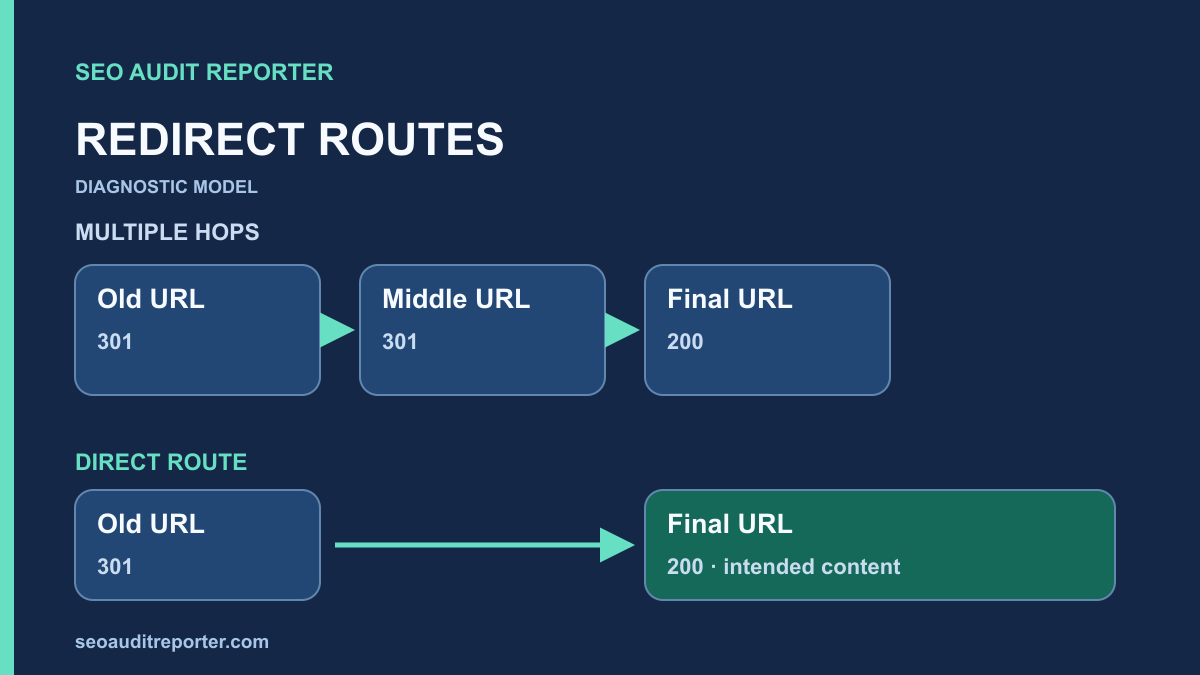
Start with the intended mapping
Build a list of source URLs and the destination each should reach. Include old routes, hostname variants, HTTP addresses, trailing-slash variations, and internal links that currently redirect. For a migration, compare the approved redirect map with the live response. For routine maintenance, ask the page owner whether the move is permanent, temporary, or unnecessary. A working response is not enough if the user lands on unrelated content.
Do not derive the map solely from a crawler’s final-URL column. That column describes observed behavior, which may already be wrong. Keep intended and observed destinations in separate fields. Add the reason for the move and the component that owns the rule, such as the application, server configuration, or a redirect plugin. This makes an unexpected hop easier to investigate without deleting legitimate rules.
Interpret 301 and 302 in context
A 301 indicates a permanent move; a 302 indicates a temporary destination. Google’s redirect documentation distinguishes how permanent and temporary redirects contribute to canonical selection. Choose the response for the intended move rather than a supposed fixed percentage of ranking value. The status alone cannot tell you whether the mapping is useful or whether other signals conflict.
A temporary maintenance page, a location-dependent route, and a permanent article migration have different requirements. Do not convert all 302 responses to 301 because an audit labels them “temporary.” First determine whether the destination is meant to replace the source. A 301 pointing to an irrelevant homepage is not made correct by being permanent. A deliberate 302 is not made defective by existing for more than one crawl.
Collect the complete chain with a real request
Test representative URLs with GET, following redirects while preserving every response header. Record the source status, each Location value, the final status, and the final address. The browser address bar only shows the endpoint and can conceal intermediate hops. A command-line request makes the sequence inspectable without requiring a particular browser extension.
curl -sS -L --max-redirs 10 -D redirect-headers.txt \
  -o final-page.html https://example.com/old-guide/
This command is an illustrative check for a public page on a site you are authorized to test. Review the headers file as well as the final HTML. The redirect cap prevents an endless investigation request; it is not a claim about a search engine’s own limit. Check authentication and cookies before comparing this result with a signed-in browser session.
HEAD is useful for a quick response check, but applications sometimes handle it differently from GET. If they disagree, inspect the actual GET response and report the difference. Repeat the test with the request conditions that reproduce the issue. A user-agent header that resembles a crawler does not prove that the requester is a verified search crawler.
Separate a chain from a loop
A chain eventually reaches a destination through intermediate URLs. A loop revisits the same route or alternates between incompatible rules. In a hypothetical chain, an old article might redirect to an older category path, then to the current article. The proper repair depends on why the intermediate route exists. Often the old source can point directly to the final replacement, while the intermediate source retains its own direct mapping for incoming links.
For a loop, look for conflicting assumptions between layers. A server may enforce HTTPS while an application believes the original request was HTTP. A hostname rule may prefer www while another rule removes it. A locale rule may switch between two versions when a cookie is missing. Record the exact repeated sequence and request conditions before editing either rule.
Prioritize loops and failed final destinations on important journeys. Then address widespread chains in shared navigation or templates. A single deliberate hop for hostname normalization is not the same problem as a looping product route. Put the finding in the context of a technical SEO audit rather than ranking all 3xx responses as errors.
Audit HTTP, HTTPS, www, and non-www together
Request all four hostname and protocol combinations for a small sample of real paths. Confirm that path and query information survive when they should. The homepage can normalize correctly while nested paths are sent to the wrong place. Test the root, an article, a category, and a retired URL. Examine both the chain and the destination content.
Do not change DNS or certificate settings merely to shorten a chain. Identify the layer that adds the unnecessary hop first. A valid certificate is needed before an HTTPS request can receive an HTTP redirect; the redirect cannot repair a browser’s failed certificate check. Keep protocol security and URL mapping as separate acceptance checks, and use the host’s supported configuration process for infrastructure changes.
Check canonical and sitemap agreement
Open the final page and inspect its canonical annotation. If the final destination points back to the redirecting source, investigate which template supplies the canonical. An old URL, a new URL, and an unrelated preferred URL create a relationship that needs explanation. Use the canonical audit to compare those signals before replacing annotations sitewide.
Inspect the sitemap and internal links for sources that now redirect. They may still work for visitors, but linking directly to the intended destination removes unnecessary dependency on the old route. Preserve appropriate redirects for bookmarks and external links while updating the site’s own references. Redirects and direct internal links serve different purposes; removing the former because the latter was fixed can break old visits.
Find the source pages still using old targets
Export inlinks to redirecting URLs from your crawl. Group by source template so you can separate one editorial link from a navigation component repeated across the site. Inspect the underlying anchor and its context. A link might be generated from a stale menu item, a saved content field, or an application route helper. Repairing the source is often cleaner than layering another redirect.
Check fragments as well as paths. A destination may return 200 while the linked section no longer exists. Query parameters may carry useful information that a broad rule accidentally discards. The broken internal link guide covers these visitor-level failures. Do not declare a link repaired simply because the final HTTP response succeeds.
Repair the rule that creates the extra hop
Find the authoritative location for the mapping and preserve a copy before changing it. Review rule order and broad pattern matches. A catch-all rule can shadow a specific redirect or send every retired page to the same destination. Test specific and neighboring routes, including URLs that must remain unaffected. If the rule belongs to a shared platform, involve the owner rather than adding competing rules in a plugin.
Keep the repair focused. Updating an old source to the correct final URL does not require rewriting every route on the site. If the destination is wrong or missing, fix that problem before celebrating a shorter chain. Where no relevant replacement exists, an honest not-found response may be more appropriate than a forced redirect. Document the editorial decision behind that choice.
Verify after deployment
Repeat the same GET requests against the public production URLs. Test all relevant variants and inspect the final content, canonical, internal references, and preserved query information. Check for cached redirects in an ordinary browser and compare with a fresh command-line request. If a difference remains, trace the response headers and responsible cache rather than changing unrelated routing.
Use a controlled crawl comparison to confirm that affected source links now point directly to the intended destination and that no new loops or errors appeared. Keep the previous evidence next to the new chain. A successful live repair can precede updates in search reporting, so record deployment verification separately from any later canonical or indexing outcome.
Redirect audit closeout checklist
- Every tested source has an intended destination and a documented reason for the redirect.
- Permanent and temporary responses reflect that intent.
- The complete chain, final status, and final content have been inspected.
- Protocol and hostname variants behave consistently on real paths.
- Loops, conflicting rules, and irrelevant destinations have been resolved.
- Internal links, sitemap entries, canonicals, fragments, and parameters have been checked.
- Public GET requests and a comparable crawl confirm the repair.