
A crawler reports hundreds of broken links, but the visitor sees only one bad navigation item. Another broken URL appears once in an old guide and has no useful replacement. These findings need different repairs. Start with the page that contains the link, the destination that fails, and the journey the link was supposed to support.
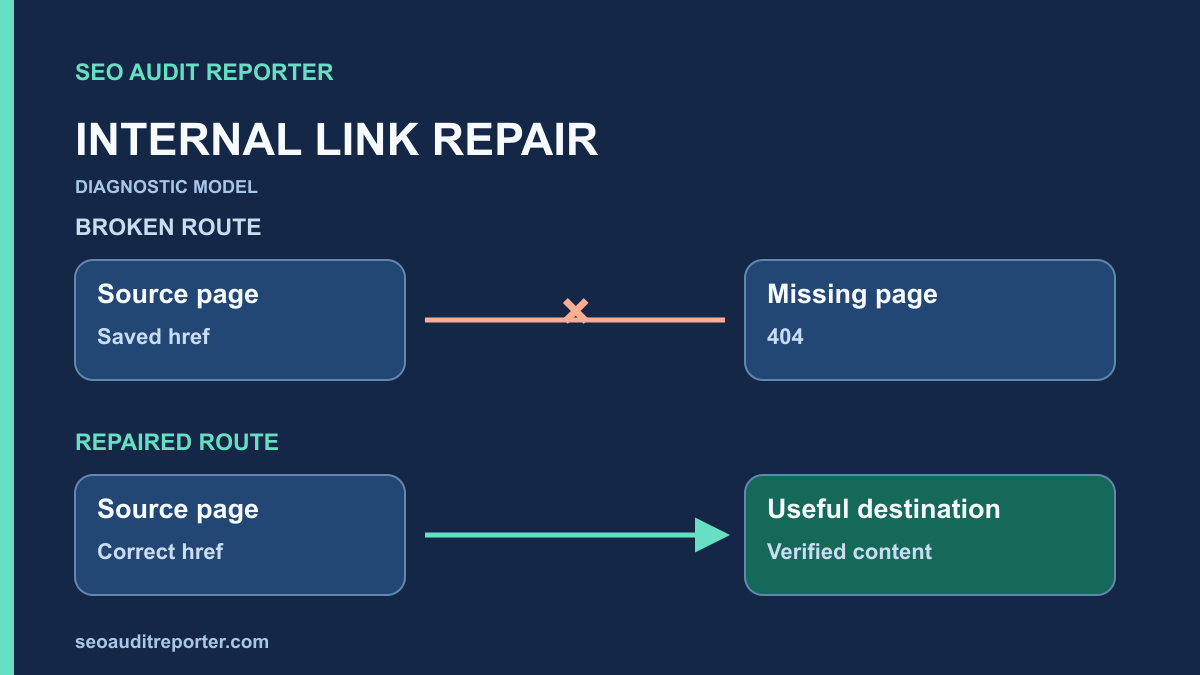
Separate a broken destination from a broken linking decision
A broken internal link connects a page on your site to an internal destination that does not deliver the expected experience. A 404 or 410 is an obvious candidate. A timeout, repeated server error, redirect loop, wrong document, or missing fragment can also break the journey. A successful HTTP response alone does not prove that the link works.
Keep redirecting links in a separate review group. A link that reaches the correct page through a permanent redirect is not equivalent to a dead end, although linking directly to the destination can simplify maintenance. Use the redirect audit workflow when the failure involves several hops or conflicting normalization rules.
Google distinguishes HTTP errors from pages that return success while displaying an error. Its HTTP status documentation explains this soft-404 distinction. For your audit, record both the response and the visible result rather than turning every 200 into a pass.
Collect source pages, not just a list of failing URLs
Run a link-following crawl from the normal public entry points. Record the start URL, allowed hosts, exclusions, rendering mode, authentication state, and time. Crawl only the site you are authorized to inspect, at a rate the server can handle. Keep this configuration with the exported results so the same test can be repeated after repair.
Export internal destinations with their response codes and the incoming links to each destination. You need the source URL, anchor text, resolved target URL, link location, and whether the link is present in the original HTML or appears after rendering. Some tools call these incoming links or inlinks; the useful evidence is the relationship, not the label.
A list containing only destination URLs cannot show whether one shared footer produces most of the warnings. Count both unique failing destinations and affected source pages. Group by template or link location before estimating effort. One corrected navigation component can resolve many source relationships without editing every page separately.
Inspect the exact link in context
Open a representative source page and find the anchor in its surrounding paragraph or component. Inspect its href, not just the text displayed to visitors. Relative URLs can resolve differently from what an editor expects, especially when a trailing slash or nested directory changes. A copied staging hostname may also look normal in the visible anchor.
Check the final resolved destination in the browser. For fragment links, confirm that the destination contains the intended element ID. A missing fragment often returns HTTP 200 and will not appear in a status-code-only report. For downloadable files, confirm that the response is actually the expected file rather than a login page or HTML error document.
Reproduce each failure before assigning a fix
Request the target with GET and record the redirect chain, final URL, status, and content type. A HEAD response is useful supplementary evidence, but some server configurations treat it differently. Repeat an intermittent failure at a modest rate before concluding that the document is permanently broken.
Compare an ordinary visitor request with the crawler request when only the crawler fails. Security filtering, rate limits, cookies, or request headers may explain the difference. Do not disable security controls merely to obtain a clean report. Identify the specific rejected request and coordinate a narrowly scoped test with whoever manages the server.
If the source link appears only after JavaScript runs, compare the initial HTML with the rendered DOM. Google recommends standard anchor elements with usable href values in its crawlable links guidance. A clickable control that depends on script behavior deserves a separate review from a normal anchor pointing to a missing page.
Choose a repair based on the original purpose
The destination moved
Confirm the intended replacement with the content owner. Update the source link to that exact destination. If the old address remains in external references or saved bookmarks, an appropriate permanent redirect may also be needed. The redirect handles requests to the old URL; updating the internal link fixes your own site’s current recommendation.
Do not send every removed URL to the homepage. A broad destination can conceal a broken journey without satisfying the original intent. If no close replacement exists, remove the recommendation or explain the removal in the source content. A legitimate removed resource can return a proper error response without making every incoming link worth preserving.
The href was entered incorrectly
Repair the spelling, path, protocol, or hostname at its source. Check whether a reusable component or import process generated the error. Correcting one article will not solve a malformed URL created by the same template on every new page. Add a content-level check to the relevant publishing process when the cause is repeated manual entry.
The destination should still exist
Investigate routing, publication state, permissions, and deployment before replacing the link. A public guide accidentally changed to a private state needs a publication fix, not a redirect to unrelated content. A server error affecting an entire section needs an operational repair before an editor starts rewriting anchors.
Prioritize affected journeys and shared causes
Start with links that block essential navigation, account tasks, documentation access, or frequently used content paths. A shared menu pointing to a removed section can deserve urgent attention even if the crawler reports only one unique destination. An obscure archive link may reasonably wait when a more consequential defect is unresolved.
Use observed evidence where available: source-page visits, actual clicks, support reports, or server requests. These signals help establish reach, but missing tracking does not prove that nobody uses a link. State uncertainty explicitly. Do not claim a precise ranking loss from the number of broken links in an export.
Connect the finding to your broader technical audit. Record the affected template, likely cause, proposed change, owner, and acceptance check. This keeps a link cleanup from distracting the team from a sitewide access failure or another issue with a larger demonstrated impact.
Preserve useful connections when editing
Removing an obsolete link can be correct, but check whether the destination will lose its only useful route from the site. If the page remains valuable and public, find a relevant parent or related guide that should reference it. The orphan-page investigation explains how to compare link discovery with other URL inventories.
Use an anchor that describes the destination’s purpose in the sentence. Avoid replacing helpful text with a repeated keyword solely for optimization. The repaired link should make the reader’s next step clear, and the surrounding paragraph should still make sense when read without clicking.
Verify the source and destination together
After deployment, reload the actual public source page and inspect the saved href. Request the destination again and confirm its final content. Test relevant mobile navigation or interactive components if the link location depends on viewport or interaction. A correct database value is insufficient when cached HTML still contains the old link.
Repeat the crawl with the same scope and compare the source-target pairs using the before-and-after crawl process. Check that the repaired links disappeared from the failure group and that no new broken paths were introduced. Review a sample of shared-template fixes manually rather than relying only on a smaller warning total.
Close the finding with evidence
- Identify the source page and exact link location.
- Record the original response and visible failure.
- Explain whether the resource moved, disappeared, or became inaccessible.
- Choose a relevant replacement, restoration, or removal.
- Verify the live href and destination with GET.
- Recheck shared components, fragments, and affected navigation journeys.
A completed repair connects a useful source recommendation to the intended destination. The crawler count is supporting evidence; the functioning journey is the result you are trying to preserve.